


How to Improve Home Office Efficiency with a Wireless Label Printer

Using a wireless label printer is one of the fastest and most affordable ways to improve home office efficiency. It reduces clutter, speeds up organization, minimizes errors, and streamlines workflows without adding complex systems.
Most home offices struggle with the same issues. Papers pile up. Cables get mixed. Storage boxes look identical. Shipping supplies scatter across desks. Over time, these small inefficiencies cost hours every week.
If you work remotely, run an online store, manage freelance clients, or operate a small business from home, organization is not optional. It directly affects productivity, turnaround time, and even stress levels.
According to workplace productivity studies, employees waste nearly 1–2 hours daily searching for misplaced information or materials. In small offices, that number can increase because systems are informal. The solution is not more complex software. It starts with better physical organization.
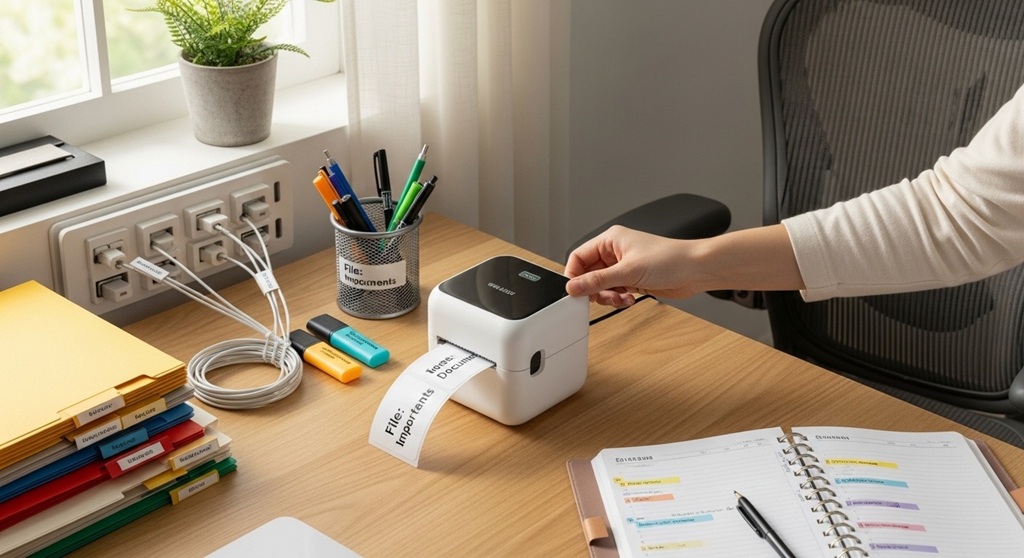
A wireless label printer is a compact piece of small office equipment that creates instant labels for folders, cables, shelves, shipping packages, and inventory. It connects via Bluetooth or Wi-Fi and prints directly from your phone or computer. No bulky setup. No cable clutter.
In this guide, you will learn how a wireless label printer transforms your workspace, supported by practical examples and real-world data. You will also discover how to choose the right portable printer for your home office tools setup.
Why Do Home Offices Lose Productivity?
Home offices lose productivity because of disorganization, manual labeling, inconsistent systems, and workflow interruptions.
The Problem
You start your day ready to work. Within minutes:
- You search for a client contract.
- You untangle charging cables.
- You open three drawers to find shipping labels.
- You recheck addresses because handwriting is unclear.
These small delays stack up. Over a week, they translate into lost focus and missed deadlines.
The Agitation
When systems are unclear:
- Files get misplaced.
- Inventory errors increase.
- Shipping mistakes happen.
- Tax documents get mixed.
- Client materials are hard to locate.
Disorganization also increases cognitive load. Your brain constantly tracks unfinished tasks instead of focusing on deep work.
The Solution
A wireless label printer creates structure instantly. It turns random drawers into categorized storage. It transforms cables into clearly identified connections. It standardizes your filing system.
This is not about decoration. It is about reducing friction in daily operations.
How Does a Wireless Label Printer Improve Workflow?
A wireless label printer improves workflow by standardizing organization, reducing manual errors, and automating repetitive labeling tasks.
1. Faster File Retrieval
Labeled folders reduce search time. A simple printed label with date, category, and project name allows instant recognition.
2. Streamlined Shipping
If you run an eCommerce business, a portable printer that produces address and barcode labels saves time and improves accuracy.
3. Better Inventory Control
Labeled storage bins prevent duplicate purchases. You know what you have.
4. Reduced Cable Confusion
Labeling chargers and adapters avoids plugging errors and saves time during meetings.
5. Standardized Office System
Consistency improves efficiency. When every shelf and drawer follows the same labeling format, you remove guesswork.
| Task | Without Label Printer | With Wireless Label Printer |
|---|---|---|
| Finding Files | Manual search (5–10 min) | Instant recognition (under 1 min) |
| Shipping Packages | Handwritten labels | Clear printed labels |
| Inventory Tracking | Memory-based | Labeled bins and shelves |
| Cable Management | Trial and error | Clearly identified |
Is a Wireless Label Printer Worth It for Small Businesses?
Yes. For small businesses, a wireless label printer reduces errors, saves time, and improves professional presentation.
Case Example
A small online seller processing 20 orders daily saves approximately 1–2 minutes per order using pre-printed shipping labels instead of handwritten ones. That equals 20–40 minutes saved daily. Over a year, this translates to over 120 hours saved.
Time saved equals revenue potential. That is the measurable impact of efficient home office tools.
In addition, printed labels reduce address mistakes. Shipping errors cost money. A single incorrect shipment can lead to replacement costs and negative reviews.
For freelancers managing physical documents, labeled folders prevent compliance issues during audits or tax season.
What Features Should You Look for in a Portable Printer?
The best portable printer for a home office should offer wireless connectivity, compact size, fast printing speed, and compatibility with multiple devices.
Key Features Checklist
- Bluetooth or Wi-Fi connectivity
- Mobile app integration
- Thermal printing (no ink required)
- Compact and lightweight design
- Multiple label size support
- Rechargeable battery
Thermal technology is important. It eliminates ink costs and reduces maintenance.
For small office equipment, reliability matters more than advanced features. Look for consistent output and durable labels.
How Can You Organize a Home Office Using a Label Printer?
You can organize a home office by labeling files, storage bins, cables, shelves, drawers, and workflow stations.
Step 1: Categorize Your Work Zones
- Document Storage
- Shipping Area
- Digital Equipment Zone
- Supplies Drawer
- Archive Section
Step 2: Standardize Label Format
Use consistent font size and structure:
- Category – Date – Project Name
- Inventory Code – Item Name
Step 3: Label Everything Visible
Clear labeling reduces decision fatigue. You know exactly where things belong.
Step 4: Review Monthly
Reprint labels if categories change. Maintain system integrity.
Does Labeling Improve Focus and Mental Clarity?
Yes. Organized spaces reduce cognitive load and improve task focus.
Research in environmental psychology shows clutter increases stress levels. A structured workspace supports better concentration.
When everything has a place, your brain stops tracking where items are. That frees mental energy for strategic thinking and creative tasks.
Home office tools are not just physical assets. They influence behavior and performance.
How Much Can You Save with a Wireless Label Printer?
You save time, reduce errors, and eliminate ink costs with thermal portable printers.
- No ink replacement costs
- Lower shipping mistake rates
- Reduced duplicate purchases
- Less paper waste
For small operations, small improvements compound over time.
What Makes a Wireless Label Printer Better Than Traditional Printers?
Wireless label printers are faster, more compact, and purpose-built for labeling tasks.
Traditional printers:
- Take more desk space
- Require ink cartridges
- Print slower for small labels
- Need cable connections
Wireless models:
- Connect instantly via mobile
- Print in seconds
- Require minimal setup
- Fit inside drawers
For home office efficiency, simplicity wins.
Conclusion: Is a Wireless Label Printer a Smart Upgrade?
Yes. A wireless label printer is a low-cost, high-impact upgrade for any home office.
It reduces friction. It speeds up tasks. It prevents errors. It supports professionalism. Most importantly, it creates a system you can rely on daily.
Efficiency is not about working longer. It is about removing unnecessary steps.
If your desk feels cluttered, your shipping process feels slow, or your files are hard to manage, start with labeling.
Take action today. Review your current home office tools. Identify problem areas. Invest in a reliable portable printer. Build a system that supports growth instead of slowing you down.
Small improvements create measurable results.
Frequently Asked Questions (FAQs)
1. Can a wireless label printer connect to smartphones?
Yes. Most modern wireless label printers connect via Bluetooth or Wi-Fi and include mobile apps for easy design and printing.
2. Do wireless label printers require ink?
Most use thermal printing technology, which does not require ink or toner. This reduces operating costs.
3. Is a portable printer suitable for shipping labels?
Yes. Many portable printers support standard shipping label sizes and barcode printing.
4. How long do thermal labels last?
Thermal labels typically last several months to years depending on exposure to heat and sunlight.
5. Is a wireless label printer good for remote workers?
Yes. Remote workers benefit from improved document organization, cable management, and workspace efficiency.
6. What is the difference between a label maker and a standard printer?
A label maker is designed specifically for labels. It is compact, faster for small prints, and often wireless.
Related Topic: Consider These Things for Your Metal Fabrication Project
Read Next: Things to Consider for Your Next Metal Fabrication Project